
Features
Everything the visit needs. Nothing it doesn't.
Specified Inspection Platforms is not a form builder with a field review theme. Every screen was shaped by an actual site visit — which is why there are so few of them.
In the field
One hand, gloves on, no signal.
The iPad is held over a parapet in the rain. Every interaction is sized for that, not for a mouse.
Tap-through statuses
Yes, No, Pending, In-Progress, Action Item or N/A — chips on an iPad, a single tap-to-cycle button on a phone. Marking an item as an action item raises the action item automatically.
Photos in place
Take the photo from inside the item you're documenting and it stays attached to it — arrows, callouts and a dimension drawn with a finger included. Numbered P-001, P-002, and renumbered if you delete one.
Plan-view pins
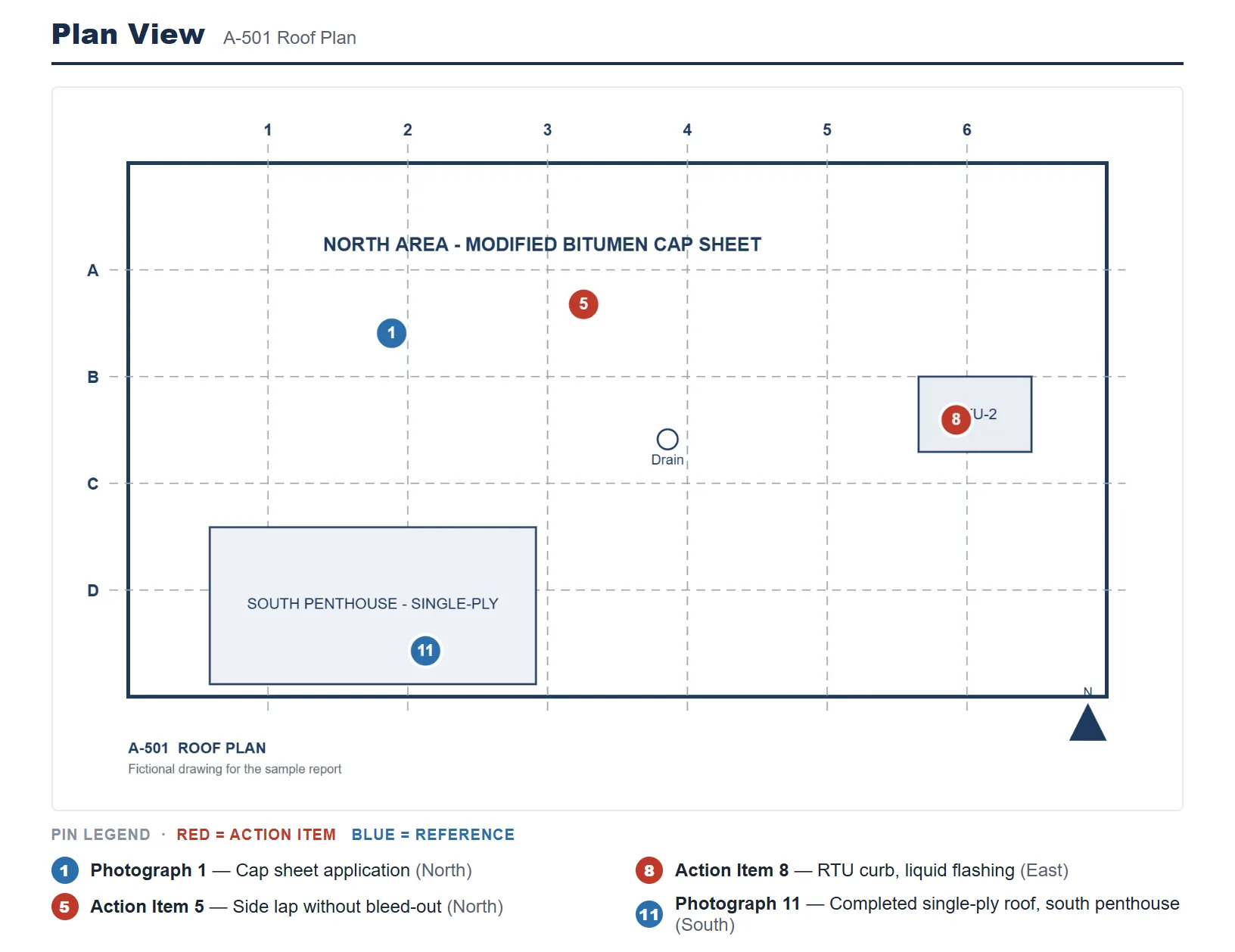
Drop numbered pins on the plan sheet so a reader knows exactly where on the deck the observation was made. Red for action items, blue for reference.
Step-by-step test forms
Numbered procedures — field testing to AAMA 501.2, 502 and 503 among them — record a status, a note and a photo per step, not just per item.
Undo
A real undo, including for deleted photos. Field mistakes happen with wet hands.
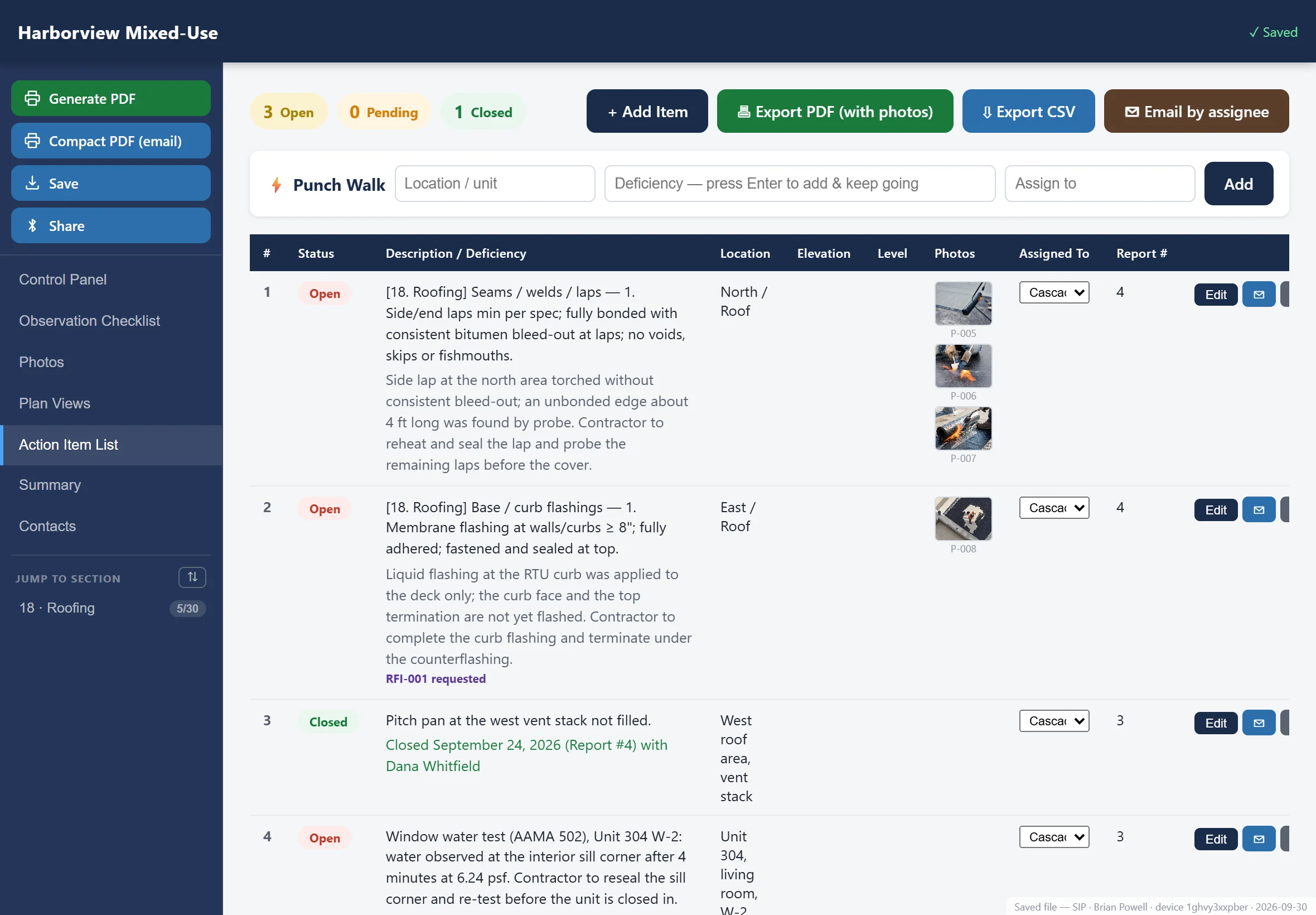
Action items
The part your client actually reads.
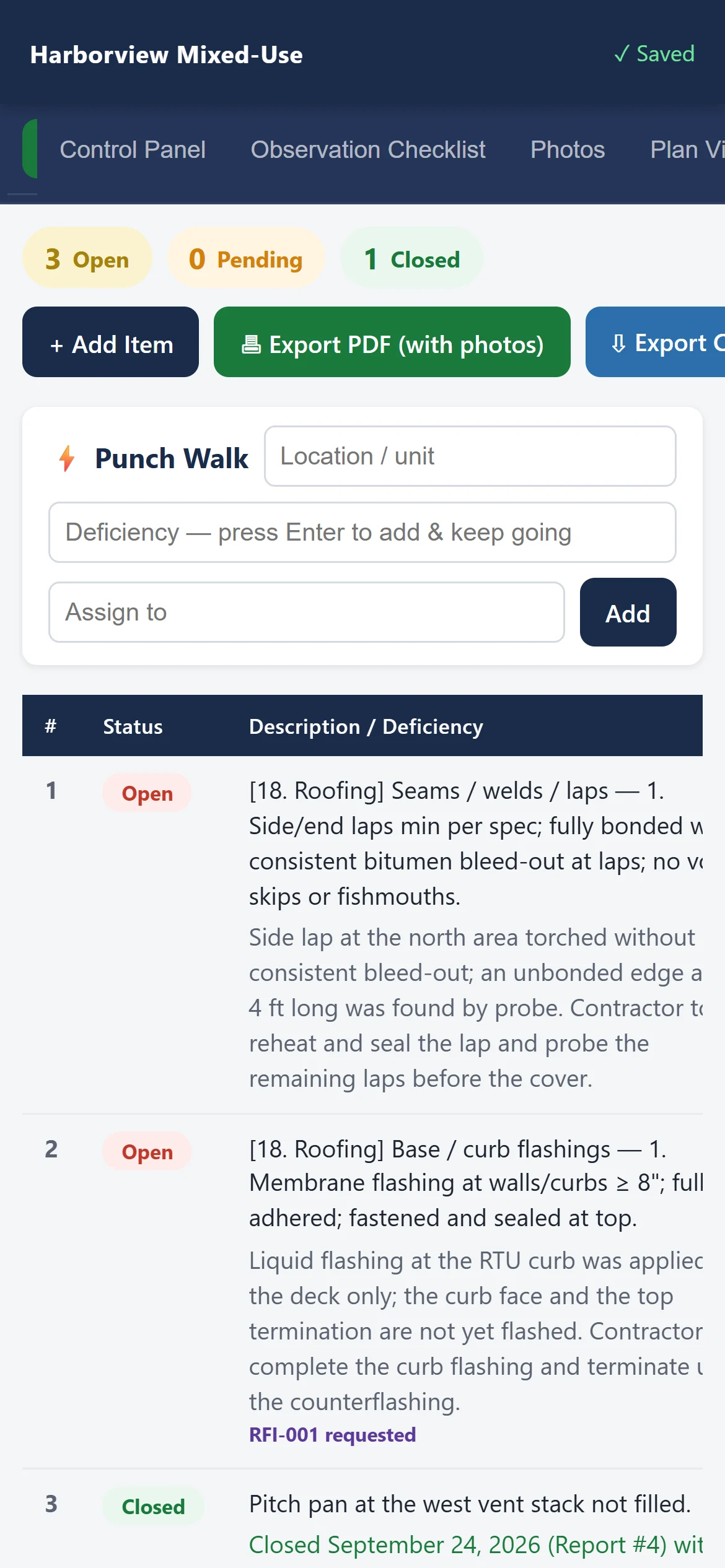
Everything that needs a response becomes a numbered action item with the photo attached, the location named and the responsible party assigned.
- Carried forward between visits — an open item from visit three is still open on visit four until someone closes it
- Closed items log keeps a running history on the device, so nothing quietly disappears
- Email straight to the responsible party from the action-item list, with your firm's branding on the export
- A dedicated log page in the report — one card per item, with its status, resolution, location and photos
The report
Generated on site, formatted like a deliverable.
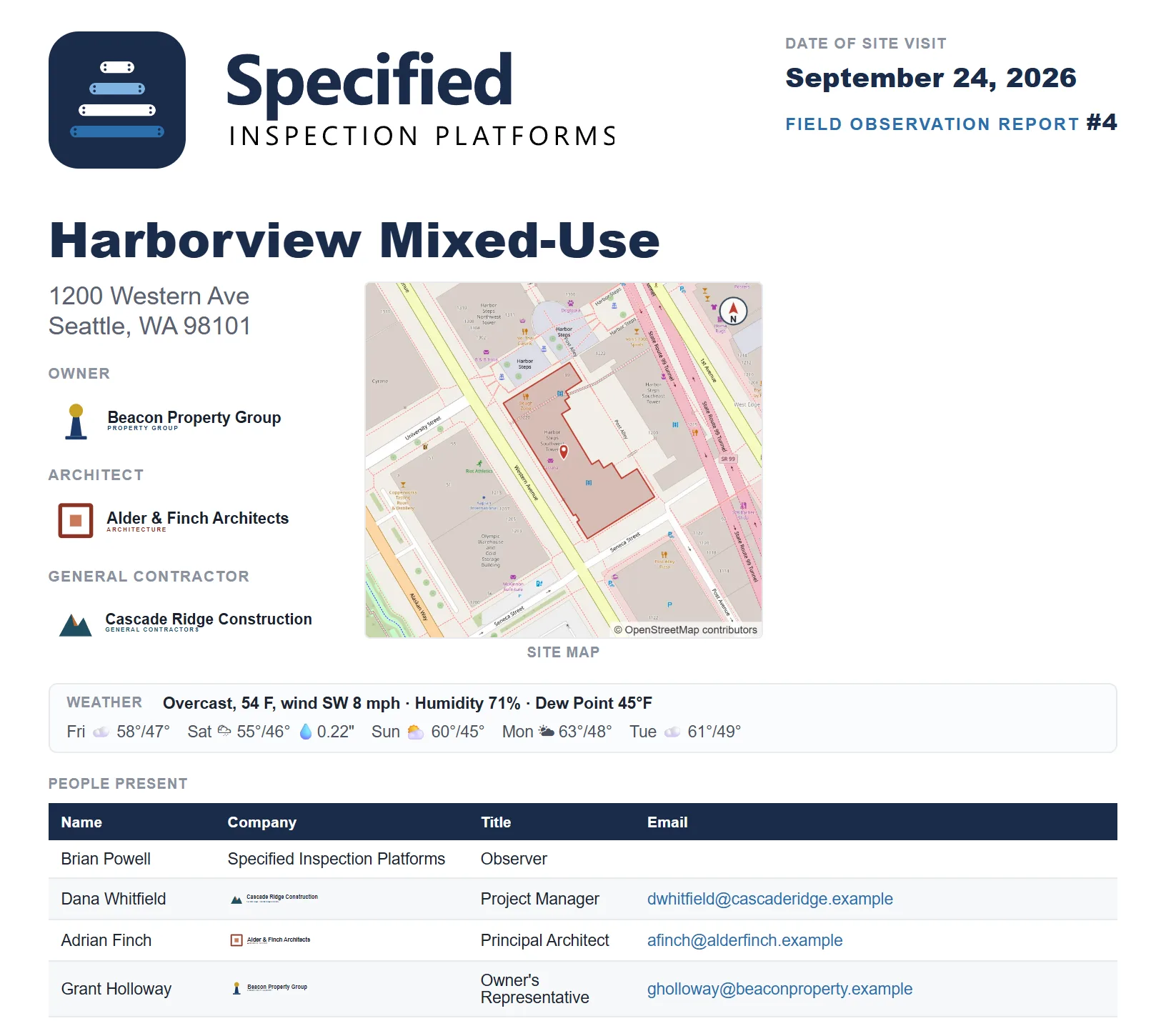
Not a data dump with your logo on top. A paginated document, built the way your clients already expect to receive one.
Observations by system
Organized the way the assembly is built, with the exception statuses summarized up front so a busy owner sees the problems first.
Pre-flight check
Catches blank fields, missing photos, unanswered items and spelling before you leave the site — and never blocks you from generating anyway. Then a signature block with one column per observer.
Compact PDF & CSV
A full-resolution report for the record, a compact version for email, and a CSV of the observations for whatever your office does next.

After you issue it
It files itself, into your own storage.
A finished report does not stop at somebody’s inbox. With your firm’s document storage connected, issuing a report files the document and every photograph that belongs to it into that project’s folders — in your system, under your permissions, named the way your office names things. Nobody drags anything anywhere.
And the photographs do not arrive as a camera-roll dump. They are sorted into a folder per site visit, and each file is named with the report number, the photograph number and the checklist item it documents — so the name carries the meaning, not just a counter:
Field Observations / Photographs / 2026-09-04 /
Report 6 P-003 - Below-grade waterproofing - membrane lap at footing.jpg
Field Observations / Reports.
Those patterns are yours to change. Every kind of file — reports, photographs, stamped submittals, RFIs — has a folder rule and a naming rule your firm edits, with tokens for the date, the report, the section and the rest, and any rule can be switched off. The scheme above is only what we ship with.

What "white-labeled" actually means here
- Your firm's name and logo on the report cover and every export
- Your staff in the observer list, with their real titles
- Your projects, contacts, GCs, architects and owners preloaded
- Your file naming — reports save as your firm names them
- The home-screen icon on the iPad is yours
- Our only mark is a single software credit on the report’s last page
Your firm, not ours
The deliverable belongs to you completely.
A building envelope report is your firm's professional product. It should lead with your firm, not your software vendor.
Each firm gets its own edition of the app, built from its own data — so one client's contact roster can never appear in another's. Your projects and people come from a workbook your office controls, and a rebuild takes minutes.
Specified against installed
The app knows what was supposed to be there.
An envelope argument is almost always the same argument: was it installed as specified? So the product carries the specification, not just the observation — and it notices when the two disagree.
Basis of design, per project
The office lists what the project was specified with — window line, cladding, flashing, air barrier, waterproofing, roofing. Picking the project fills that list in, puts each named system into scope, and prints a Basis of Design table on the report cover. Observers correct it in the field when the job says otherwise.
A product catalog, built in
One library of products by manufacturer, tied to the checklist systems, ships with every edition. It feeds the basis-of-design picker and autocompletes products on tests and photographs, so nobody types a system name from memory on a windy roof.
Substitutions get caught
Read a label off a photograph and the app matches it against the basis of design for that system. If it names something else, you are told, and offered a pre-written action item naming both products and the photograph. Offered — never raised behind your back.
The small things, which are the whole job
Written by someone who was late for dinner.
Voice dictation anywhere
A mic button on any field. Gloves on, hands cold, still describing the condition into the record rather than remembering it for later.
A standard comment library
Phrases per system, one tap into the narrative. The sentences you write on every project, written once.
Measure on the photograph
A dimension tool in the annotator, so a gap or an overlap is a number on the image instead of an adjective in a paragraph.
Duplicate a test for the next unit
Testing runs five near-identical units in a morning. The setup carries; every outcome is cleared, so a copied Fail can never enter a report as a unit that was never observed to fail.
Electronically signed
The observer signs on the iPad, or picks a handwriting style and the app renders their own name. It prints above their name with the date and time. Always a deliberate act — nothing auto-signs a report.
Built for how envelope work actually runs
A project isn't one visit. It's twenty.
Next Visit
Start the next observation with the project, the roster and the open action items intact — and last visit's photos cleanly cleared out.
Reset Section
Re-review a single system without disturbing the rest of the report.
Mock-up reviews
Dedicated window, wall and door mock-up checklists — the reviews that set the standard for everything built after them.
Reopen any saved report
A saved report file is also a working file. Open it years later and everything is still there, no login and no version of our software required.
Who it adapts to
One platform, shaped to the work you actually do.
Same mechanics every time — walk it, mark it, photograph it, issue it. What changes is the library behind the checklist.
Beyond the base library
Or we write the library around your market.
The standard libraries ship loaded and cover most of what most firms review. When your work has its own vocabulary, its own sequence or its own client expectations, that becomes an upgrade rather than a limitation.
- Custom branding — your logo, colors, cover page and signature block, so the deliverable reads as your firm's document and nobody else's
- A library built for your market — authored with your input, in the language your reviewers and your clients already use
- You work with a person, not a form builder. One named contact who learns how you review and stays with it
- Send us what you have — your existing checklists, report templates, specifications, or just a conversation about how the walk goes — and we get to work
How it goes
Base libraries keep updating quarterly underneath your custom work.
The fastest way to judge it is to see it.
Tell us what you review and we’ll show you the product on your own systems.