
For developers and ownership
Our platform. Your space to work it out.
Every disagreement on a development ends up as a number. Costs, RFIs and submittals sit here with every change and disputed amount attached to the thing it came from — recorded and managed as the job runs, so when you settle the final cost after five years of construction you know what actually happened. Weigh the options you haven’t bought yet on what they cost over a life. We are building AI to tee the work up; the deciding stays yours.
Why this exists
Two answers to the same question, and a week of email.
The envelope consultant sends one response to a submittal. The structural engineer sends another. Then comes the flurry between them, trying to get coordinated on an answer everyone already thought was settled — while the contractor waits, and the question is still open on site.
Nothing in that is anyone’s fault. There is simply nowhere for the design side to work it out together before it goes out. This is that place: they settle it, they package it, and it ships to the general contractor as one response — or as responses grouped by subject, where the question covers more than one. The reasoning stays on the record, in a space owned by the person paying for the building.
There is a second version of the same problem. Your consultants work for a dozen owners, and every contractor runs something different — Procore on this job, Trimble on the next, a shared drive and an inbox on the one after. Your consultant is a guest in all of them, so nothing ever adds up into a single list of what is open on your building.
Your register here is that list, and it does not care what anyone else runs. An RFI or a submittal joins it by forwarding the email or pasting the link, so it works with every system on every job you own.
And we plug in. The Hub connects to your firm’s Egnyte. Link a project to its drawings folder and a revised sheet dropped in there is filed in the register as a new version, with the team told; site photographs and stamped submittals go the other way, filing back into the project folder by your firm’s own rules. Read and upload only — it never deletes, moves or renames anything. A Procore connector is next, and an owner can make connecting it a condition of the contract.


A view from our own site visits. Most of the developers we work with build in these two cities, which is where we started on purpose.
The Development Hub
One place the project is actually tracked.
Not a stack of PDFs in an inbox. A live record per project, open to the people you invite, held in your name.
You run it — or whoever you put in charge of the job does. We are a software company: we stand the Hub up, customize the modules and libraries to the scope we agree, and hand you the infrastructure. We do not manage your project, review your buildings, or sit between you and your team.
- Every visit, in orderEach report as it was issued, oldest to newest, with the photographs attached
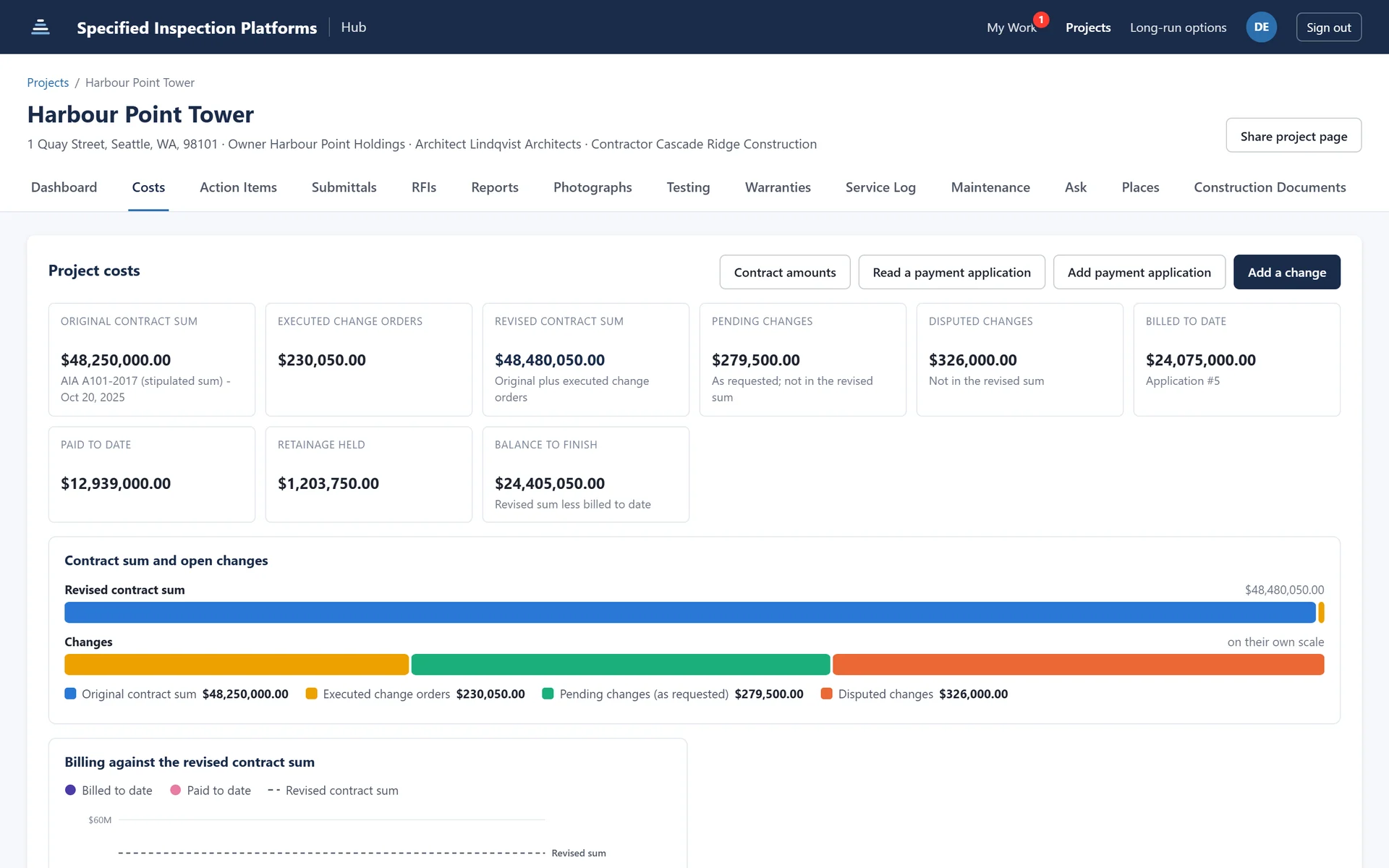
- The cost positionOriginal contract sum, executed and pending changes, billed, paid, retainage held
- Payment applicationsRead one against the contract instead of taking the number on trust
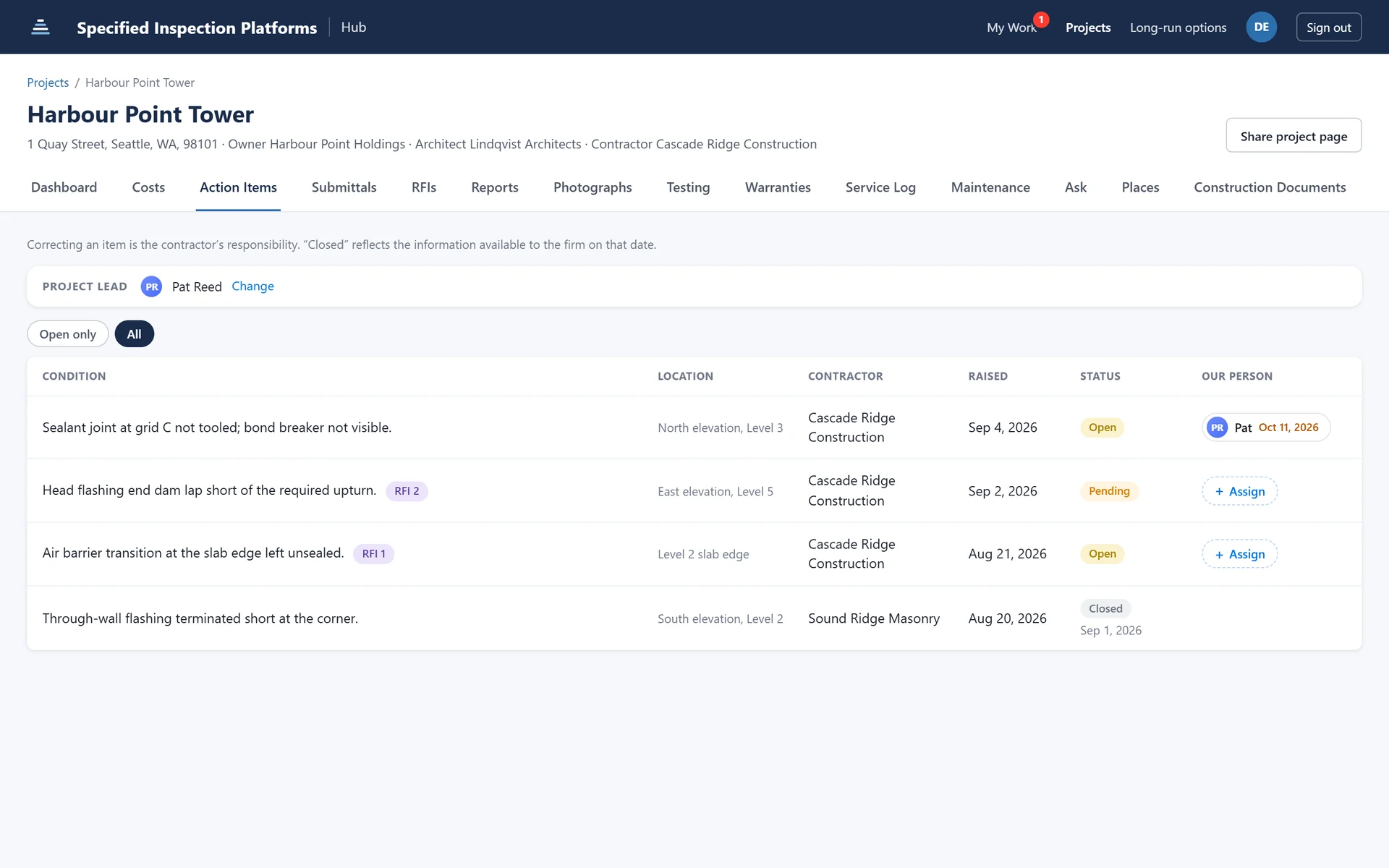
- Action items with a name on themYour person and your due date, not only which contractor it went to
- Submittals and RFIsTracked together, with the question and the answer in one place
- Field testing and its resultsWhat was tested, what it did, and the photographs taken at each step
- WarrantiesWhat is covered, by whom, and until when — found before you need it
- The service and maintenance logWhat has been done to the building since it opened
- Drawings and specificationsThe contract documents beside the work they describe
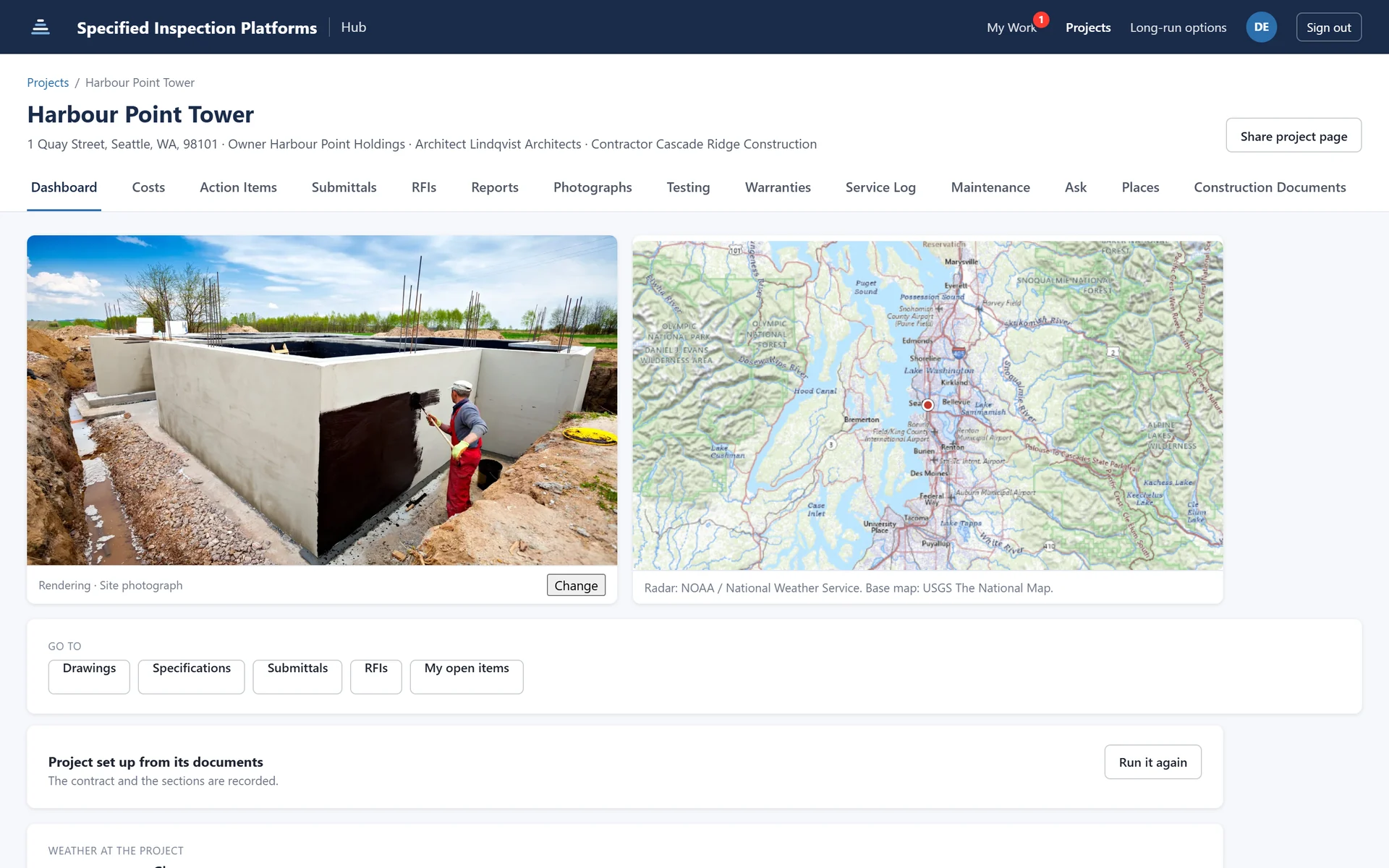
However you want it
Two ways to run it, and neither needs anyone’s permission.
The first question most owners ask is what happens if the contractor already has a platform. The answer is that it makes no difference to you.
On its own
A standalone project hub that belongs to you. We stand it up and shape the modules and libraries to the scope we agree; after that it is yours to run how you like, with the people you invite. Every consultant reports into it, and nothing outside it is required.
Right for a developer who wants one standard across a portfolio and does not want to inherit whichever system each contractor happens to prefer.
Beside whatever the contractor runs
The GC keeps Procore, Autodesk, Trimble or an inbox. Your Hub sits alongside it as the owner’s own space, and the record still ends up on your side. An RFI or submittal joins your register by forwarding the email or pasting the link, which works with any system on any job.
Our Egnyte connector runs today, filing documents both ways. A direct Procore connector is next, and an owner can make connecting it a condition of the contract.
You are not choosing once and for all. A project can start standalone and gain a connector later without moving anything.
The clause
One line in the contract, and the record is yours.
You already tell a contractor which submittal system to use, what photo platform to load to, and what format to hand over at closeout. This is one more line in the same schedule — and it is the cheapest thing on this page, because it costs you nothing and it compounds.
It binds the job, not the software
A clause attaches to the project and survives everything else. The GC changes their platform, their PM leaves, a sub is replaced — the obligation to report into your record does not move.
It is worth writing before the connector exists
Our Egnyte connector runs today. A Procore connector is next. Write the clause into the contracts you are signing now and the connector lands into a job already set up for it, instead of a renegotiation two years in.
It settles the argument once
Nobody has to be persuaded on a Tuesday with a crew waiting. The contractor priced the obligation when they bid the job, which is the only time anyone is relaxed about it.
What leaves the Hub
Your side settles it. Their system gets the answer.
The working out stays on your side — the disagreement, the documents, who said what. What leaves is the part the contractor needs: one settled response, or responses grouped by subject where the question covered more than one, with the reasoning kept on your record rather than sent with it.
It leaves in the shape the receiving end wants. Into the contractor’s system where there is a connector, as a document where the job runs on email, and either way the official answer is still entered by whoever owns that record. We are the step before it, not a replacement for it — which is exactly why no contractor has a reason to refuse the clause.
Before it becomes a change order
When two contract documents disagree, somebody has to decide.
The detail ends the membrane at the slab edge. The spec wants it lapped six inches onto the slab. Which governs? On most jobs that question gets asked by a foreman, on site, with the crew waiting — if it gets asked at all.

It is asked of the right people
Pinned to the disciplines whose documents disagree, not sent to a distribution list where everyone assumes somebody else will answer.
It is settled on the record
They comment, they decide, it is marked settled. Who decided what, and when, stays on the job rather than in somebody’s inbox.
It is cheap at this stage
The same conflict found after the work is in is a change order, a delay, and an argument about who should have caught it.
From ownership’s end
Your building, your standard, your record.
One standard across the portfolio
The same library, the same statuses and the same report format on every building you own, whoever is walking the site that week. Two projects become comparable instead of two writing styles.
Open items that survive the visit
An item opened on visit three is still open on visit four until somebody closes it, with the photograph and the resolution attached. Nothing closes out on a promise made in a meeting.
Every party reports into your record
The envelope consultant, the structural engineer, the roofing observer, the testing agency. Their visits file into the same project, in order, instead of arriving as four PDFs in four formats.
Your room, not the contractor’s
Ownership and the design team settle a response together, with the documents pinned beside the discussion, and the answer goes out in the name of the whole team — as one response, or grouped by subject where a question covers more than one. The contractor sees the answer, not the working out.
Handover Planned
Unit turnover, done the same way as the envelope.
The last six weeks of a residential development are a hundred small reviews repeated per unit, tracked on a spreadsheet, and argued about at closing. It is the same problem as a roof: a list, a status, a photograph, and somebody has to be accountable for the fix.
Unit turnover reviews
Walk a unit against the same checklist every time, so unit 412 is held to what unit 118 was held to. Statuses, photographs and action items behave exactly as they do on the envelope.
Unit inventories
What is in the unit, recorded as it is handed over: appliances, fixtures, finishes and their condition on the day, photographed. The record a dispute about move-in condition needs and nobody ever has.
Finish checker
The finish schedule carried into the unit, so an observer confirms what was installed against what was specified — and a substitution is caught at the unit rather than at closing.
Available now
What you can have on a project this month.
- Envelope reviews across 20 system categories, on your buildings, in one format
- Field testing to AAMA 501.2, 502 and 503, recorded step by step with the result
- An action item list carried between visits, exported to whoever has to act on it
- Reports generated on site the day of the visit, on the consultant’s letterhead
- A Development Hub, opened project by project, where your side works from the live record
If you already retain a consultant, they can run this on your projects tomorrow. If you want your own people walking units, that is the same app with a different library.
Bring us one building.
Put one project on it and compare the record you get against what you have now. Tell us the portfolio and we will tell you honestly what fits today and what is still being written.